Showing posts with label Digital Media Studies. Show all posts

Tuesday, September 17, 2013

Nuance


Nuance / 2013
Travail sur l’image vivante musicale. 
Musique : “Ants” de EdIT / Planet Mu Records
Video: Marc-Antoine Locatell
Danse : Lucas B.

Utterly genius in regards to every aspect.
The digital
The Choreography
The dust, light and movement create an unforgettable experience for the viewer.
Reminds me of previous post on the finger-tutting genius's ad.

Thursday, March 22, 2012

LONDON 2012 OLYMPICS


2012年のロンドンーオリンピックの広告。
全部アルファベットで描いてあるんだ!
さすがプロには私は全然負ける。。。
---------
"Athens, Greece-based designer Charis Tsevis just put out a new set called Chariots of Color 2012 that's inspired by the upcoming London Olympics."

An ad campaign for the 2012 London Olympics using typography.
Unbelievably talented work.


Saturday, November 26, 2011

Project 1

My first two projects from my Digital Imaging Class at Scripps College.
The project was to find a concept and create a photoshop project from scratch.

A remake of my Highschool Painting on Photoshop.

Monday, May 9, 2011

Final Project Sneak Peek!

              We've been moving steadily along in my Digital Art class, and are now doing animations and flash projects in processing.  Unfortunately I still don't know how to upload them onto my blog!!  I've done a Christmas-themed flash (as can be seen in one of my older posts), and am working on a storyline animation.  Here's a sneakpeak of my final project -- a story of a Pig as he is raised on a farm.  This is definitely the most time-consuming project so far!  But still so much fun :)

              最近 DIGITAL ART のクラスではアニメーションやフラッシュを作っています。でも、その宿題をブログに入れるコードがよく分からないのでまだ入れてません!でも最終プロジェクトの写真をどうぞご覧ください!子豚が大人になる旅の話です。今まで一番難しくて時間を入れた宿題です。もうすぐ終わります!応援してね〜


A screen shot of the animation!

Wednesday, May 4, 2011

Random Generator 2

             Since I didn't like the final product of my last random generating program, I decided to incorporate the random generator into one of my old patterns.  (See previous blog for original pattern).
Instead of randomizing the shapes/location (like in my letters one), I randomized the colors to get more variety.  It was a bit more interesting than before!!

            この前に作ったプログラムがそんなに好きじゃなかったので、新しいのを作ってみました。前に作ったパターンを使って、ランダムのプログラムを作りました。今回は形と場所ではなく、色を変えてみました。前よりもっと楽しいセレクションを完成出来ました!

Original with randomly generated OUTER dots/line colors.

Adding on randomly generated MIDDLE dots/line colors.

All randomly generated dots/line colors.

Original starburst, randomly generated background circle colors.

Sunday, May 1, 2011

Random Generator

              This assignment was to create a random generator in Processing -- so every time you ran the program, a different, random, and unique piece would appear.  We were told to use two letters (I used Y and A) and create a random-generating code.  These are the first 6 pieces that my program came up with when I played it.  I like it, but I wish there was more variety available. 

              この宿題は新しいプログラムを作って適当なパターンを作る事。毎回再生を押すと新しいイメージが出てくるはず。私はYとAを使ったイメージを作りました。これが最初の六回再生を押したイメージです。以外と楽しくなかった。。もうちょっと違うものが出て来たらよかったと思います。けっこうおそろいに見えるのが嫌い!


Thursday, April 28, 2011

Flash Applet PREVIEW

                 We've been working on animations and flash applets in my Digital Art class.  Unfortunately I don't know how to embed the actual animation onto this blog, so I can only take screen captures of them.  Remember that these are interactive and fun!  It's just a simple screen shot of an awesome animation.  The first one is a simple code -- "Make Circles".  Wherever you move your mouse, a white ellipse (circle) with a black outline will follow.  The second was much harder;  I incorporated random generators and flash coding and was able to create a pretty Christmas animation.  The "star" on top of the Christmas tree follows around your mouse.

                  DIGITAL ARTのクラスの新しい宿題を見てください!今回は動くアニメーションを作ってみました。最初の方はパソコンのモウスを動かして白い丸の形を作るプログラムを作りました。そのコードはとても単純で早く出来ました。でも次の方はクリスマスのテーマで、パソコンのマウスを動かしてクリスマストリーが着いてくるアニメーションです!どうやってこのブログに入れるのかがまだ分からないので、アニメーションの写真をとってここにアップロードしました。いつか全体的に見せてあげたいので頑張ります!


The circles in the background flash, the "presents" are stationary, and the tree follows the mouse!

Monday, April 18, 2011

Processing Patterns

            Continuation of the programming tool called "Processing" in my Digital Art I class.  (C++ and Java as the language.)  Second assignment was to use repetition, coding, and mathematical logarithms to create patterns.  The color gradient is created by hundreds of ellipses (circles), all different colors.  There is no one block of color that makes "gradients".  The assignment was fun, but it was a lot of trial and error. 

            PROCESSINGを使ってまた新しい宿題が出ました。今回はコードや算数を使ってパターンを作る事!色の作り方とか様々な形を使ってパターンを作るのは難しかったけど楽しかったです。99%はためして、直す、ためして、直す。の繰り返しでした。色を好きな色に変えるのが大変でした。。。


 Again: "super-fun" coding! This time more mathmatical/logical codes.

Tuesday, April 12, 2011

ROBOTS

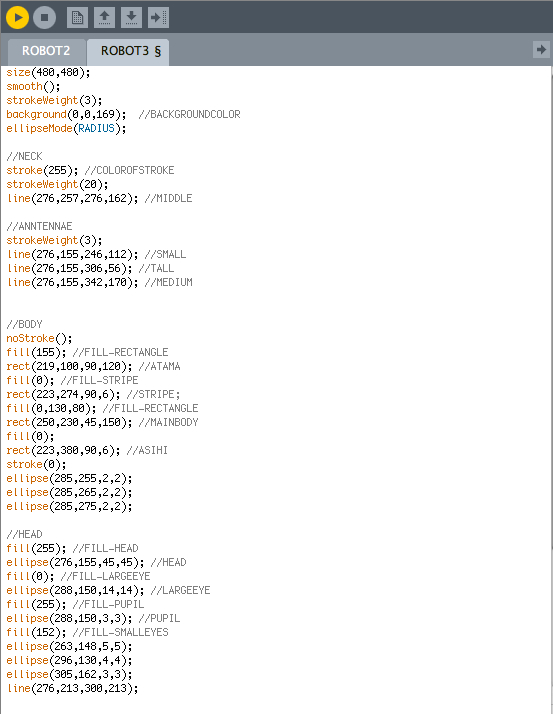
            We've just started using a programming tool called "Processing" in my Digital Art I class.  We use C++ and Java as the language.  Having never done programming before, I was definitely nervous.  Luckily, it wasn't as hard as I thought!  The first assignment was to copy a robot off of our textbook, create it in programming, and alter it using different codes.  It was a rudimentary assignment to help us dive into the new language.  Here are my finish products!

            DIGITAL ART I のクラスで新しいプログラムを使ってます!PROCESSINGって言うコードや数字を使って絵やアニメーションを作るプログラムです。初めてなので、少し緊張したけど、以外と出来ました!今回の宿題は教科書に書いてあるロボットをまねしてPROCESSINGで作ってみる事。それが終わったらそのコードを少しづつ変えて新しいロボットを作る事!完成品をご覧ください〜

ORIGINAL ROBOT :教科書からのロボット
コードはこんな感じ!:The coding was strange....
Robot 2 : Black and White
Robot 3: NERDBOT : ガリ勉ロボット
バブルボット〜可愛いでしょ!:BUBBLEBOT!!  Such a cutie.